

Three moves that cut a jewellery site's cloud bill from ₹6 lakh to ₹1 lakh a month
AWS to DigitalOcean to Cloudflare: three architecture moves, two years, and an undocumented free-tier trap that cost weeks. What each stage actually fixed.
The infrastructure bill was ₹5.5 to ₹6 lakh a month. Around ₹3 to ₹4 lakh of it was images — not the application, not the database, not compute. Photographs of jewellery, being moved from a bucket to a browser.
Today the same brand serves roughly double the traffic, has grown revenue close to tenfold, loads faster than it ever has, and pays about ₹1 lakh for infrastructure and under ₹10,000 for images.
It took three moves over about two years, and the interesting part is that only the last one was about images at all. This is the whole sequence, including a problem on Cloudflare's free tier that is documented nowhere and cost us weeks of confusion.
Where it started: EC2, S3 and a load balancer
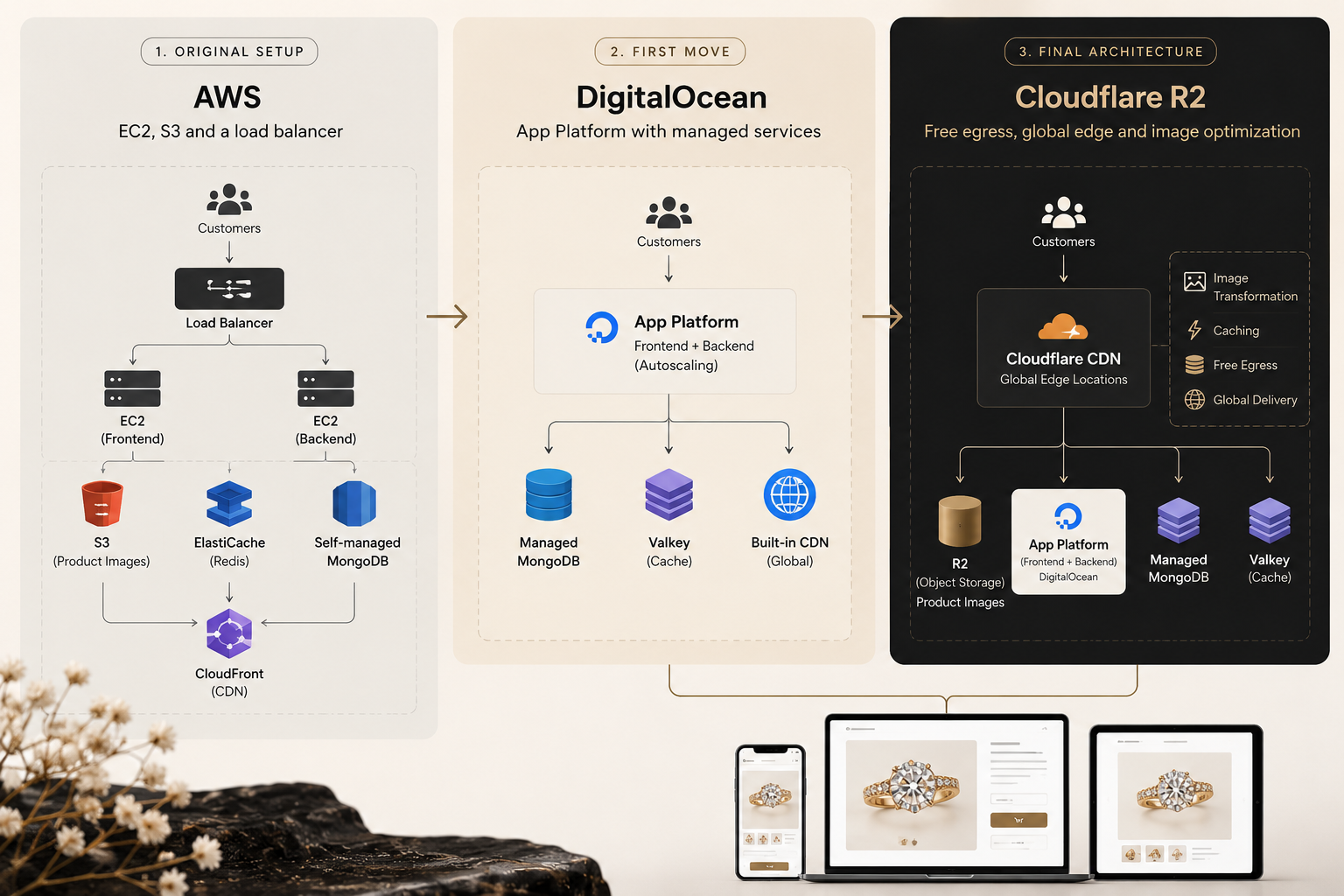
The original architecture was conventional AWS. EC2 instances behind a load balancer, product images in an S3 bucket, ElastiCache for the Redis layer, served through CloudFront.
There is nothing wrong with any of that. It is what a competent team builds, and it ran a growing jewellery business for a long time. Two things about it eventually stopped working, and only one of them was cost.
The first was operational weight. Scaling meant managing instances, managing the load balancer configuration in front of them, and making capacity decisions in advance of traffic rather than in response to it. Every festive spike was a planning exercise.
The second was that AWS had no managed MongoDB. The application needed MongoDB; AWS offers DocumentDB, which is not the same thing. That left self-managing a database cluster — backups, failover, version upgrades, the lot — as ongoing work for a team whose job was meant to be building a jewellery business.
And underneath both, the images bill was quietly compounding at ₹3 to ₹4 lakh a month, on traffic of roughly 200,000 visits.
The first move: DigitalOcean App Platform
The move to DigitalOcean was not a cost-cutting exercise. It was an architecture decision that happened to cut costs substantially.
App Platform with autoscaling, for both front end and back end. Containers scale on demand. There is no load balancer to configure in front of them, because the platform handles distribution itself. The capacity planning that used to precede every festive season became a configuration value.
Managed MongoDB. The thing AWS could not offer. Backups, failover and upgrades became someone else's operational responsibility.
Valkey in place of ElastiCache. Same role in the architecture, materially lower cost.
CDN included. App Platform serves through a CDN by default, so there was no separate CDN product to buy, configure or pay for. For a site whose largest cost was content delivery, removing a billing layer entirely was worth more than negotiating a better rate on it.
The total bill went from ₹5.5–6 lakh to ₹1.25–1.5 lakh a month. Roughly a quarter of what it had been, with less operational work attached to it.
In dollars, the whole DigitalOcean bill came to around $1,500 a month, of which $800 to $900 was image delivery alone. Still the largest single line on the invoice, and still growing with traffic.
Why it stopped working, about a year later
This is the part of the story that gets left out of most infrastructure write-ups, because it is not flattering: the fix worked, and then it stopped working.
Traffic went from roughly 200,000 to 400,000–500,000. That is the outcome everybody wants. But bandwidth grows with traffic, and bandwidth was still metered, so the bill started climbing again — for exactly the same reason it had climbed on AWS.
We had moved the problem to a cheaper venue. We had not removed it. As long as the cost of serving the site was proportional to how many people visited it, success would keep arriving as an invoice.
That reframes the question. The goal is not a lower rate per gigabyte. It is an architecture where growth in traffic does not grow the bill.
The second move: Cloudflare R2, and a trap on the free tier
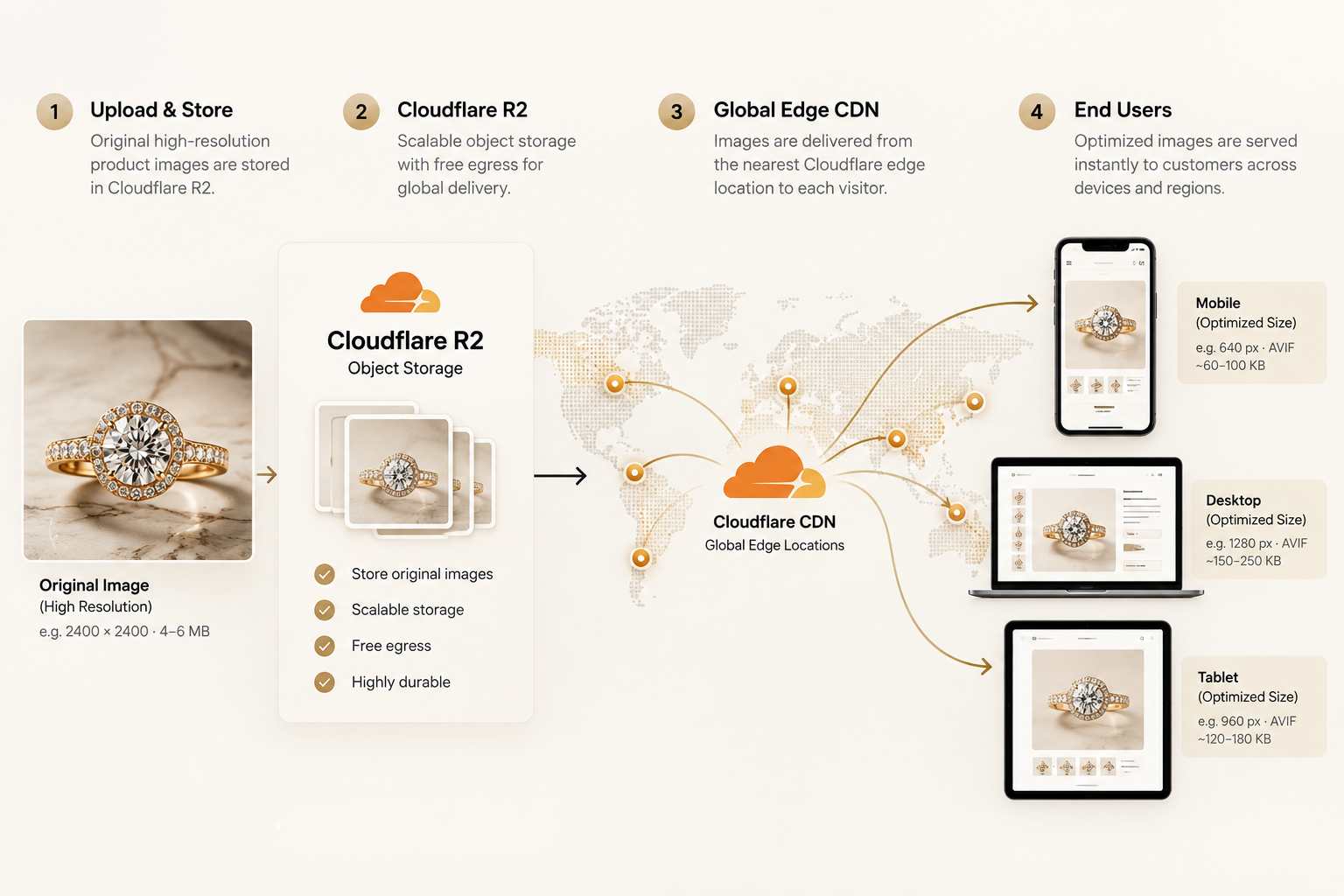
We moved image storage to Cloudflare R2, whose defining characteristic is that egress is free. Not cheaper — free. For a jewellery catalogue, where the entire cost problem is outbound bytes, that is the structural change the previous two moves had not managed.
R2's free tier covered the storage, and the bill was around $10 a month.
Then the site got slower, and it took an embarrassingly long time to work out why.
On the free tier we were being served from a region outside India. Traffic from Indian customers was being answered from somewhere in Europe or Africa. This is not stated anywhere in the documentation we could find, and nothing in the dashboard indicated it. The symptom was simply that a site which should have been fast was not, and every obvious explanation had already been ruled out.
Upgrading to the paid plan resolved it: delivery moved to the Indian edge locations, Delhi and Mumbai, and performance became what the architecture had promised. The paid CDN plan is around $25 a month; storage for roughly 500 GB of images is about $10.
If you take one operational warning from this article, take that one. Verify which region is actually serving your customers before you conclude your architecture is wrong. We spent weeks looking for a problem in our own code.
The scale this unlocked is worth stating plainly: the site now moves ~35-50TB of bandwidth per day.
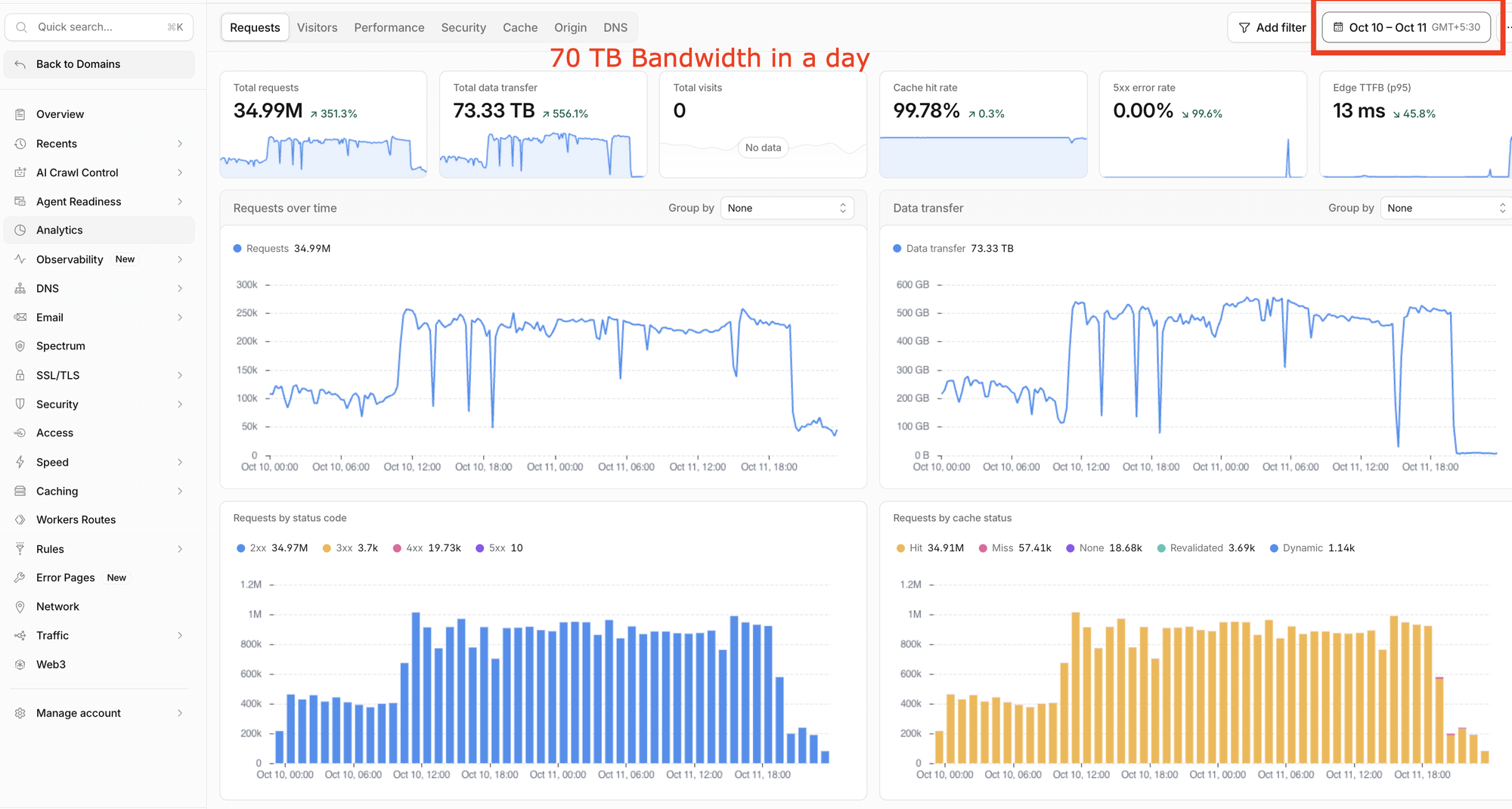
On metered egress, at AWS rates, that figure does not bear thinking about. It is the single clearest illustration of why the pricing model matters more than the price.
The third move: transformations, and finally fixing the images themselves
At this point the bill was small and the site was fast, and we still were not satisfied — because none of what we had done addressed the actual inefficiency. We were still sending a full-resolution JPEG to a phone. We had simply arranged to stop being billed much for it.
Cloudflare Image Transformations resize and re-encode at the edge, on request. One original is stored. What the visitor receives is generated for their screen and their browser.
A phone receives a phone-sized image — 640 pixels wide rather than 2,400.
Browsers that support AVIF receive AVIF, which is typically around half the size of an equivalent JPEG at the same perceived quality, and is unusually good at precisely what jewellery photography is made of: polished metal, smooth gradients, even backgrounds. In production, 97% of delivered images are now AVIF.
Nothing changed in the catalogue. No re-exports, no asking the photography team for six versions of every shot.
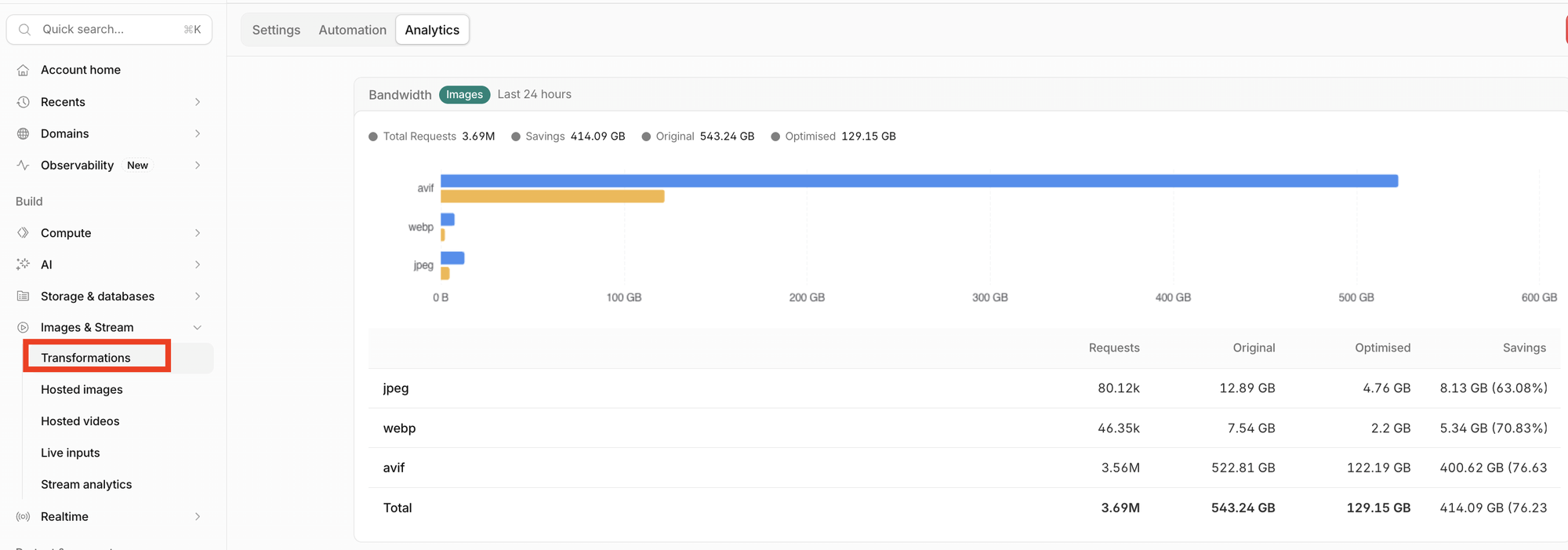
Transformations are billed at roughly $1 per 100,000, and — this is the part that makes it viable — the result is cached. You pay once per unique image and size, however many times it is subsequently served. Our transformation cost settles around $95 a month.
What it costs now, and what that compares to
Cloudflare: roughly $25 for the paid CDN plan, $10 for R2 storage, $95 for transformations.
DigitalOcean: around ₹1 lakh a month for the application, database and cache.
Set against each stage, the image line alone reads: roughly $4,100 a month on AWS, $850 on DigitalOcean, $130 on Cloudflare. About five times cheaper, then another six and a half — a factor of thirty-two overall, while traffic doubled.
That is about $130 a month for image delivery across a site moving 15 to 20 TB a day.
The comparison that matters is not against the original AWS bill, because the business has changed shape since. Traffic has roughly doubled. Revenue has grown close to tenfold. On the original architecture, the images bill alone would have scaled with that traffic — and 15 to 20 TB a day of metered egress at AWS rates is not a number any jewellery business would willingly pay.
It is also worth naming the alternative most teams reach for. A managed image service such as Cloudinary solves the same technical problem, and for a catalogue of this size and this traffic would cost substantially more than what we now pay in total.
The detail that decides your transformation bill
Transformations are billed per unique transformation, not per request. The same image at the same width served a million times is billed once. The same image at a thousand different widths is billed a thousand times.
So the variable controlling your cost is not traffic. It is how many distinct sizes your front end asks for.
This catches people out because image frameworks are generous by default. Next.js will emit sixteen candidate widths per image in a srcset unless told otherwise — sensible for a site with fifty images, expensive for a catalogue with fifty thousand, where it becomes 800,000 billable transformations, most of which nobody will ever request.
We reduced that to four device widths and three layout widths, covering every container on the site at up to 3x pixel density. The visual result is indistinguishable. The billable count falls by roughly three quarters.
Audit the number of widths your site requests before you enable transformations, not after.
What we measured
Image bandwidth: 11.74 GB down to 2.92 GB over a comparable period — 75% fewer bytes delivered.
Homepage: 762 KB of images down to 282 KB; nine unoptimised originals down to none.
Product page, desktop: 873 KB down to 82 KB. The desktop gallery, wishlist thumbnails and wide cards were plain <img> tags that no optimisation had ever touched, so they were serving originals to every visitor.
Format mix: 97% AVIF.
The site now loads comparably to the largest online jewellery brands in India, on infrastructure costing a fraction of what it did when it was slower.
The two things that did not work
You cannot rewrite requests into Cloudflare's transformation paths. The tidy approach — leave the markup alone, rewrite at the edge into the transformation URL — fails with error 1035, because Cloudflare does not permit a rewrite whose destination is an internal /cdn-cgi/ path. We established this by bisection after a sequence of increasingly puzzled configurations. The consequence is that transformation URLs must be generated in the application, so this cannot be solved purely in infrastructure.
quality=auto is not supported. It appears in enough blog posts to look plausible, it raises no error, and it silently falls back to a fixed quality of 85. If you believe you have enabled adaptive quality, you have hard-coded 85 and will tune nothing. We set an explicit value, having measured that the difference was invisible on jewellery photography.
What the sequence actually teaches
Three moves, and each one solved a different problem.
AWS to DigitalOcean removed operational weight — autoscaling instead of capacity planning, managed MongoDB instead of running a cluster, a bundled CDN instead of a separate product. The cost fell as a consequence of simplification, not as its goal.
DigitalOcean to Cloudflare R2 changed the pricing model rather than the price. Metered egress means the bill grows with success. Free egress means it does not. That is a structural difference, and no negotiation on rates substitutes for it.
Transformations finally addressed the inefficiency itself — that an image uploaded once was being delivered as uploaded, to every device, regardless of what that device could display.
The reflex when a site is slow or expensive is to buy more of what you already have: bigger instances, a larger CDN plan, another caching layer. None of those was the answer at any stage here. Each time, the fix was to remove an assumption rather than to add capacity.
For a jewellery business this compounds in a way it does not elsewhere. Your catalogue only grows. Every new design is another set of photographs, viewed rarely, which must still be delivered perfectly. Getting this right once means the next ten thousand pieces cost almost nothing to serve. Getting it wrong means every design you add makes it permanently worse.

Frequently asked questions
How much can a jewellery ecommerce site realistically save on image delivery?
In this case the image portion of the bill fell from roughly $4,100 a month on AWS to $850 on DigitalOcean and then to about $130 on Cloudflare — a factor of thirty-two — while traffic roughly doubled over the same period. Total infrastructure went from ₹5.5–6 lakh a month to a little over ₹1 lakh. How much is available to you depends on where you start. A site already serving resized, modern-format images has little to recover; one serving full-resolution JPEGs from metered storage has a great deal.
Why does egress pricing matter more than the per-gigabyte rate?
Because metered egress ties your costs to your success. Every additional visitor adds bandwidth, so growth arrives as a larger invoice. A platform with free egress breaks that relationship entirely: the site now serves 15 to 20 TB per day at no bandwidth charge, a volume that would be prohibitive under metered pricing at any negotiated rate.
What is the catch with Cloudflare R2's free tier?
In our experience, region. On the free tier, Indian traffic was being served from outside India — somewhere in Europe or Africa — which is not stated in the documentation and is not visible in the dashboard. The symptom is simply a site that is slower than the architecture suggests it should be. Upgrading to the paid plan moved delivery to Delhi and Mumbai and resolved it.
How are Cloudflare Image Transformations billed?
At roughly $1 per 100,000 transformations, counted per unique transformation rather than per request, with results cached afterwards. One image at one width costs the same whether it is viewed once or a million times. The practical consequence is that your bill is driven by how many distinct widths your front end requests, not by your traffic — which is why reducing a framework's default width list is the most effective control available.
Do we need to re-upload or re-export our product photography?
No. Edge transformation generates every resized and re-encoded version on demand from the original you already store. The photography team continues to deliver one high-resolution file per piece. That is the main advantage over resizing at upload time, which forces you to decide on sizes before you know what the site will need.
Is this cheaper than a managed image service like Cloudinary?
Considerably, at this catalogue size and traffic level. Managed image services solve the same technical problem and remove some implementation work, but their pricing scales with transformations and bandwidth in a way that becomes expensive for a large jewellery catalogue. The trade-off is engineering effort: the approach described here requires generating transformation URLs in your own application.
Does moving to this architecture require rebuilding the site?
No. The application change is to how image URLs are generated in the front end, plus configuration at the CDN. The catalogue, the CMS and the product data are untouched. The one constraint worth knowing in advance is that transformation URLs have to be produced by the application — they cannot be handled as an edge rewrite, which is the approach most teams attempt first.